
As smartphone cameras continue to improve, photos and videos consume more storage space than ever before.
Many users eventually run into the same problems:
- iPhone storage is full
- iCloud storage is full
- Monthly cloud storage subscriptions add up over time
- Thousands or even tens of thousands of photos are taking up valuable space
When it comes to backing up photos, most people immediately think of USB flash drives or portable SSDs.
However, if you've ever owned a digital camera, drone, action camera, or dash cam, you may already have several unused microSD cards sitting in a drawer.
Can these old cards still be useful?
The answer is:
Absolutely.
With a simple card reader, a microSD card can become an affordable and effective storage device for backing up your photos and videos.
What Is a microSD Card?
A microSD card (formerly known as a TF card) is a compact flash storage device widely used in:
- Digital cameras
- Drones
- Action cameras
- Dash cams
- Android phones
Many photography enthusiasts accumulate multiple microSD cards over the years as they upgrade equipment and storage capacity.
Common capacities include:
- 64GB
- 128GB
- 256GB
- 512GB
Although these cards may no longer be used in their original devices, they can still serve as excellent backup storage for photos and videos.
Does Lumin Support Backing Up Photos to microSD Cards?
Yes.
To get started, you'll need:
- A microSD card
- A card reader
- A Lightning adapter (required for older iPhone models; not needed for iPhone 15 series and newer or Android devices)
- An iPhone or Android phone
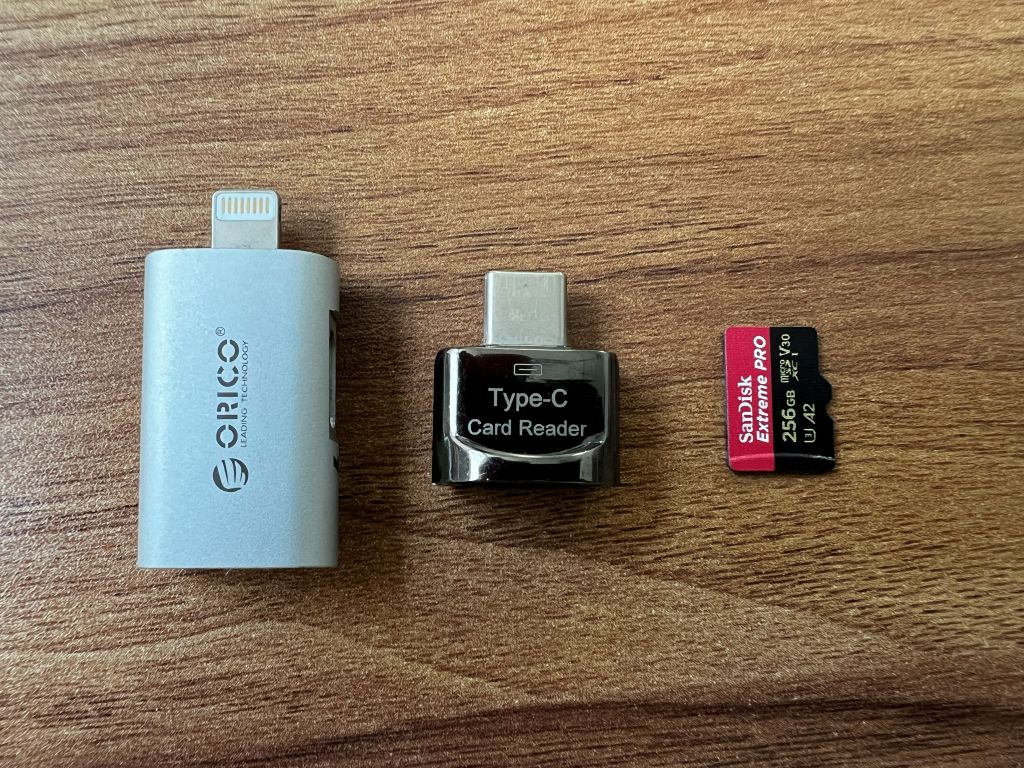
After inserting the microSD card into the card reader and connecting it to your phone, Lumin can detect the storage device and back up photos and videos directly to the card.
No computer is required.
For travelers and photographers who are frequently on the go, this provides a convenient way to protect valuable memories.
Real-World Performance Test
For this test, we used:
SanDisk Extreme PRO 256GB microSD Card
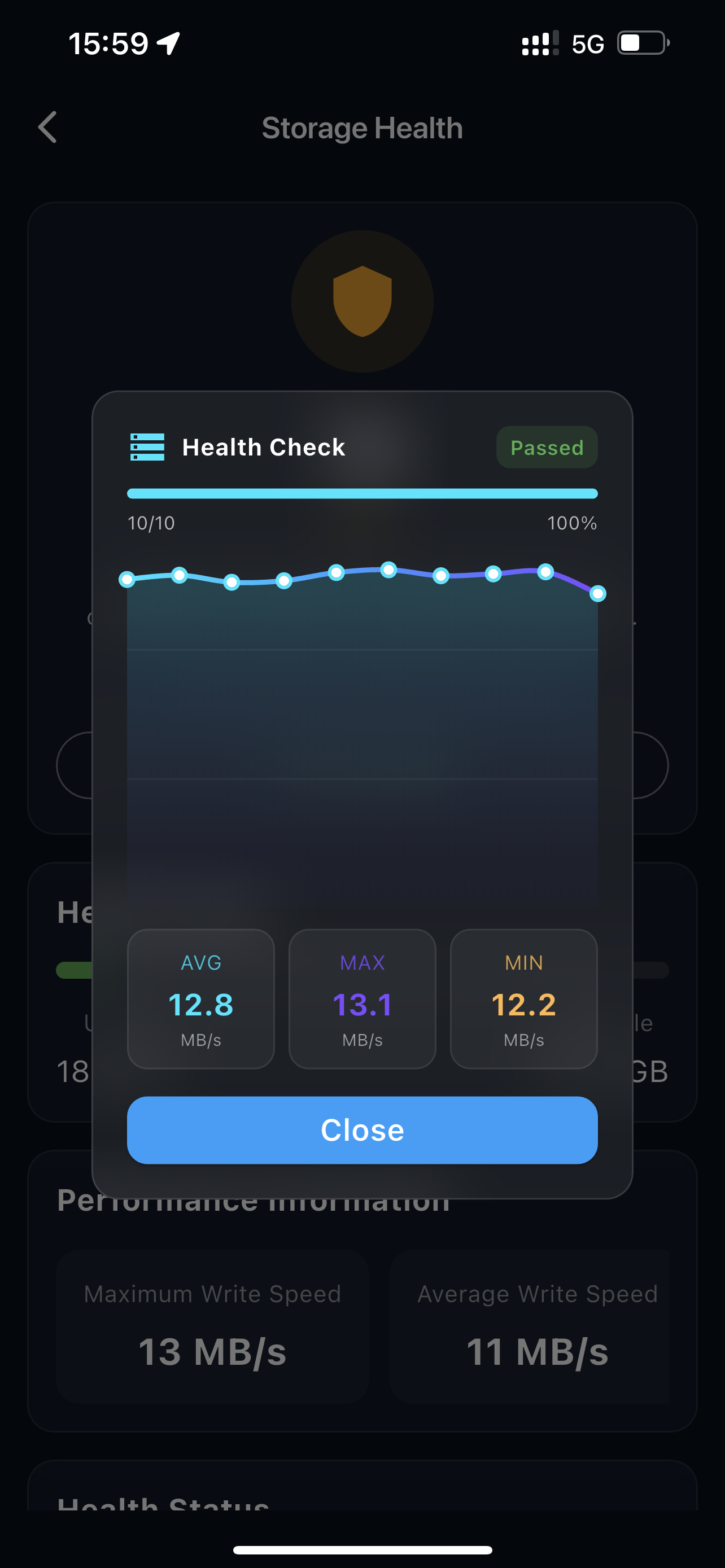
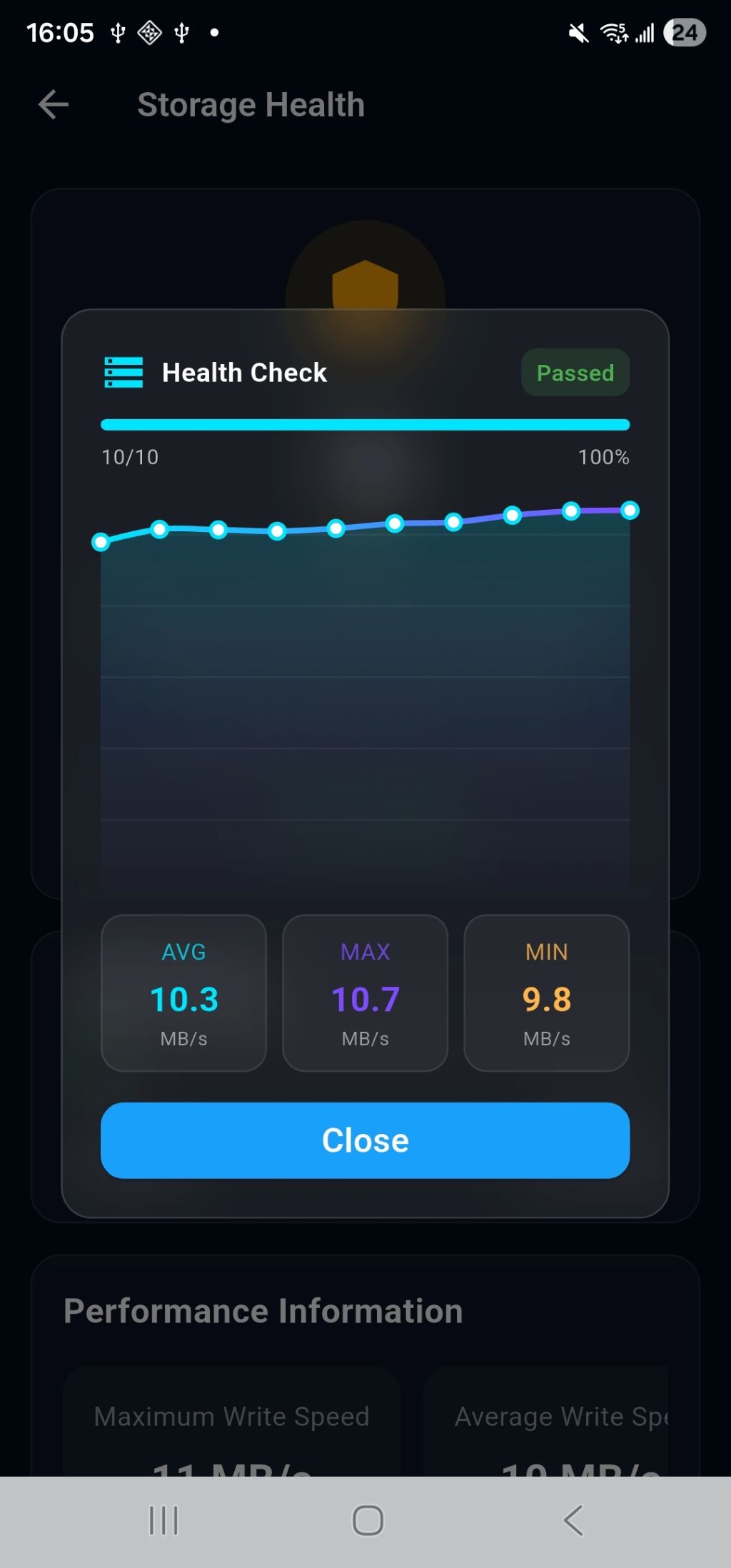
The card was connected to a smartphone through a card reader and tested using Lumin's storage performance tool.
iPhone Results
- Maximum Write Speed: 13.1 MB/s
- Average Write Speed: 12.8 MB/s
- Minimum Write Speed: 12.2 MB/s
Android Results
- Maximum Write Speed: 10.7 MB/s
- Average Write Speed: 10.3 MB/s
- Minimum Write Speed: 9.8 MB/s
While the speeds are not particularly fast, one thing stood out:
Excellent consistency.
Performance remained remarkably stable throughout the entire test, with almost no noticeable fluctuations.
For photo backup, stable performance is often more important than peak speed.
(Insert performance chart here)
microSD Card vs USB Flash Drive vs Portable SSD
Many users assume that microSD cards, USB flash drives, and SSDs are essentially the same technology in different shapes.
In reality, they are designed for different purposes and offer significantly different levels of performance.
| Feature | microSD Card | USB Flash Drive | Portable SSD |
|---|---|---|---|
| Typical Speed | 10–100 MB/s | 20–500 MB/s | 300–2000 MB/s |
| Capacity Range | 32GB–1TB | 32GB–2TB | 500GB–8TB |
| Physical Size | Smallest | Small | Larger |
| Cost | Lowest | Moderate | Higher |
| Heavy Backup Workloads | Fair | Good | Excellent |
| Photo Backup | Yes | Yes | Yes |
A simple way to think about it:
- A microSD card is like a motorcycle.
- A USB flash drive is like a family sedan.
- A portable SSD is like a sports car.
All three will get you to your destination, but at very different speeds.
Which Storage Option Lasts Longer?
Besides performance, reliability is often the biggest concern when storing valuable photos and videos.
After all, your memories are usually worth far more than the storage device itself.
microSD Card Lifespan
High-quality microSD cards were originally designed for demanding recording workloads such as:
- Photography
- Drone footage
- Dash cam recording
- Action camera recording
Popular examples include:
- SanDisk Extreme
- SanDisk Extreme PRO
- Samsung EVO Plus
- Lexar Professional
Under normal usage conditions, these cards can reliably store data for many years.
For occasional photo backups, their lifespan is typically more than sufficient.
USB Flash Drive Lifespan
USB flash drives also use flash memory technology.
However, quality varies greatly between manufacturers and models.
Premium USB drives can provide years of reliable service.
Lower-cost drives may experience:
- Performance fluctuations
- Significant speed drops during long transfers
- Reduced reliability over time
For important data, choosing a reputable brand is highly recommended.
Portable SSD Lifespan
Portable SSDs generally include:
- Advanced controllers
- Wear-leveling algorithms
- Error correction technology
- Bad block management
As a result, SSDs typically offer the highest performance, best reliability, and longest lifespan among the three options.
They are particularly well suited for:
- Large photo libraries
- 4K video storage
- Long-term archiving
Which Option Is Right for You?
If You Already Have Spare microSD Cards
Start using them.
All you need is a card reader.
Your cost is almost zero.
Ideal for:
- Occasional photo backups
- Freeing up phone storage
- Travel backups
If You're Buying New Storage
For smaller photo collections:
A 128GB or 256GB USB flash drive is often sufficient.
Benefits include:
- Affordable price
- Compact size
- Easy portability
For users who:
- Record lots of videos
- Shoot in 4K
- Maintain large photo libraries
A portable SSD is usually the better choice.
You'll get:
- Faster transfers
- Larger capacities
- Better long-term reliability
Important Reminder: No Storage Device Lasts Forever
Whether you're using:
- A microSD card
- A USB flash drive
- A Portable SSD
Any storage device can eventually fail.
For important photos and videos, maintaining at least two separate backups is strongly recommended.
For example:
- One copy on an SSD
- Another copy on a microSD card or different storage device
This ensures your memories remain protected even if one device fails.
Final Thoughts
If you still have microSD cards from an old camera, drone, or action camera, don't let them sit unused.
With a card reader and Lumin, you can turn those cards into practical backup storage for your photos and videos without needing a computer or cloud service.
For users who already own spare microSD cards, this is an extremely cost-effective backup solution.
For larger photo libraries and long-term storage needs, portable SSDs remain the best overall choice thanks to their speed, capacity, and reliability.
No matter which storage device you choose, the most important thing is developing a regular backup routine to keep your precious memories safe.
Take Control of Your Data Today
Protect your mobile data with encrypted USB backup and file-level encryption. Keep every file secure, fully under your control, and accessible anywhere — no cloud required.